Version Upgrade Guide
This guide explains how to update the Kubernetes applications in the AGENTIC STAR marketplace edition.
This feature (self-update from the admin console) is available from v2.3.0 onward. To update from a version earlier than v2.3.0, please perform a manual update (Method B).
Environments on AGENTIC STAR Basic can be updated within v2.x. They cannot be updated to v3.x. To use v3.x, purchase AGENTIC STAR Advanced (v3.3.0 or later) and deploy it as a new environment. Basic environments updated to v3.x by other means, such as applying v3.x Helm charts with Method B, are not supported.
You can choose from two methods. Method A (self-update) is recommended for most cases.
| Method | Overview | Recommended For |
|---|---|---|
| Method A: Self-update from the admin console (recommended) | Select a target version from the "Version Management" page and execute. Each service is upgraded automatically in dependency order. | Most regular updates |
| Method B: Manual update (CLI operations) | Operate kubectl / helm directly to upgrade individual charts. | When you need fine-grained control, integration into CI/CD, or recovery from a failure |
Method A: Self-update from the Admin Console (recommended)
From the "Version Management" page in the admin console, you can automatically upgrade to the next available version. Each service is upgraded sequentially in pre-defined dependency order, and you can review progress and results on screen.
A-1. Prerequisites
- You can sign in to the admin console (e.g.,
https://admin.<your-domain>) with administrator privileges - The umbrella chart (
agentic-star-platform) is published in the official Helm repository - The upgrade controller (
upgrade-controller) is running in AKS
A-2. Open the Version Management page
After signing in, click "Version Management" in the left sidebar.
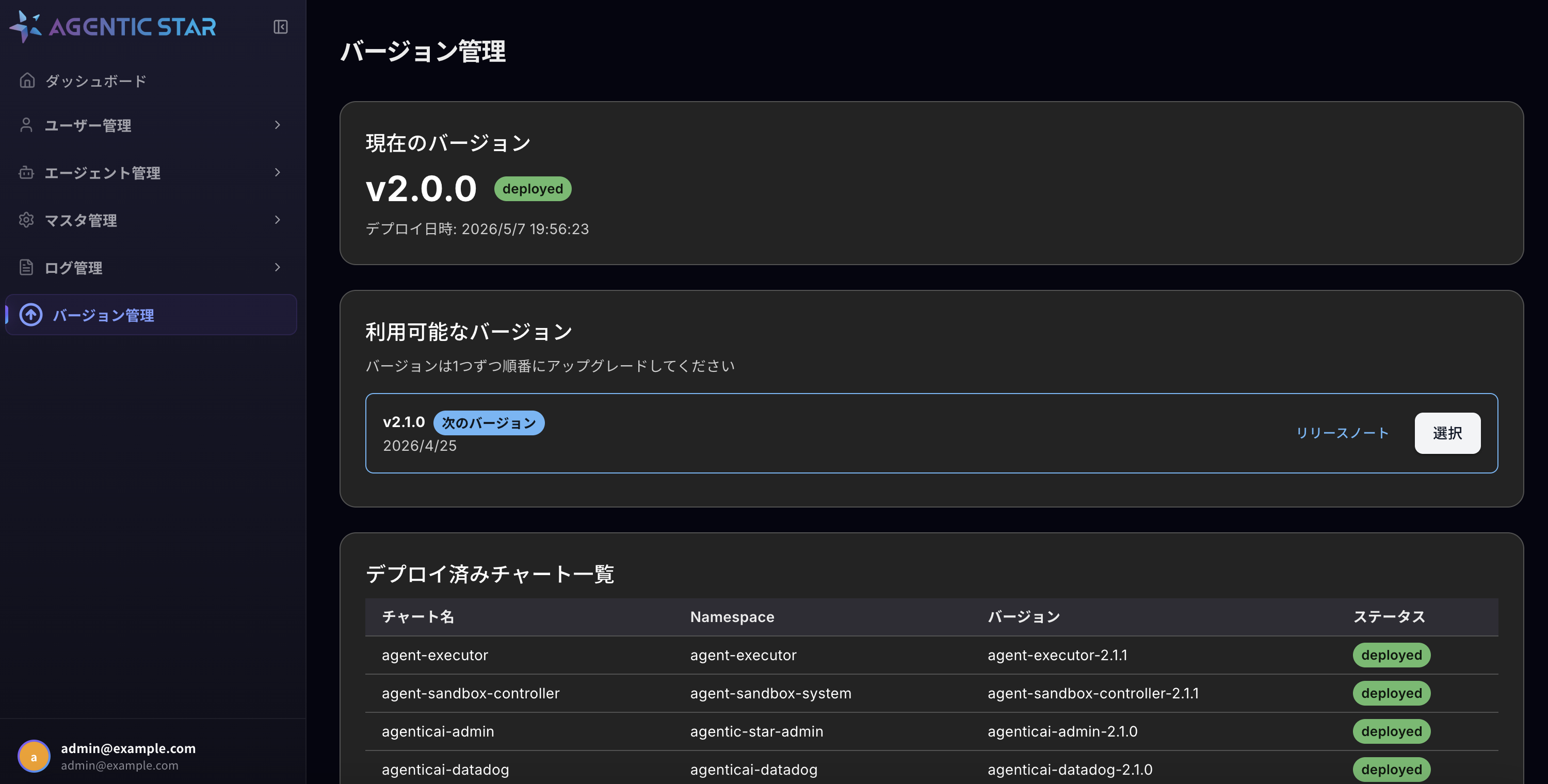
The page shows:
- Current version: The currently deployed platform version (e.g.,
v2.0.0) anddeployedstatus - Available versions: The next upgradable version (with a "Next version" label) and a link to each version's release notes
- Deployed charts: Current version and status of each sub-chart
The available versions list follows a sequential upgrade model. You cannot jump multiple versions ahead — you must apply each "Next version" in order.
A-3. Select an upgrade target
In the "Available versions" section, click the "Select" button on the right side of the next version you want to upgrade to (e.g., v2.1.0).
A-4. Review release notes and changes
The "Upgrade Analysis" page is displayed.
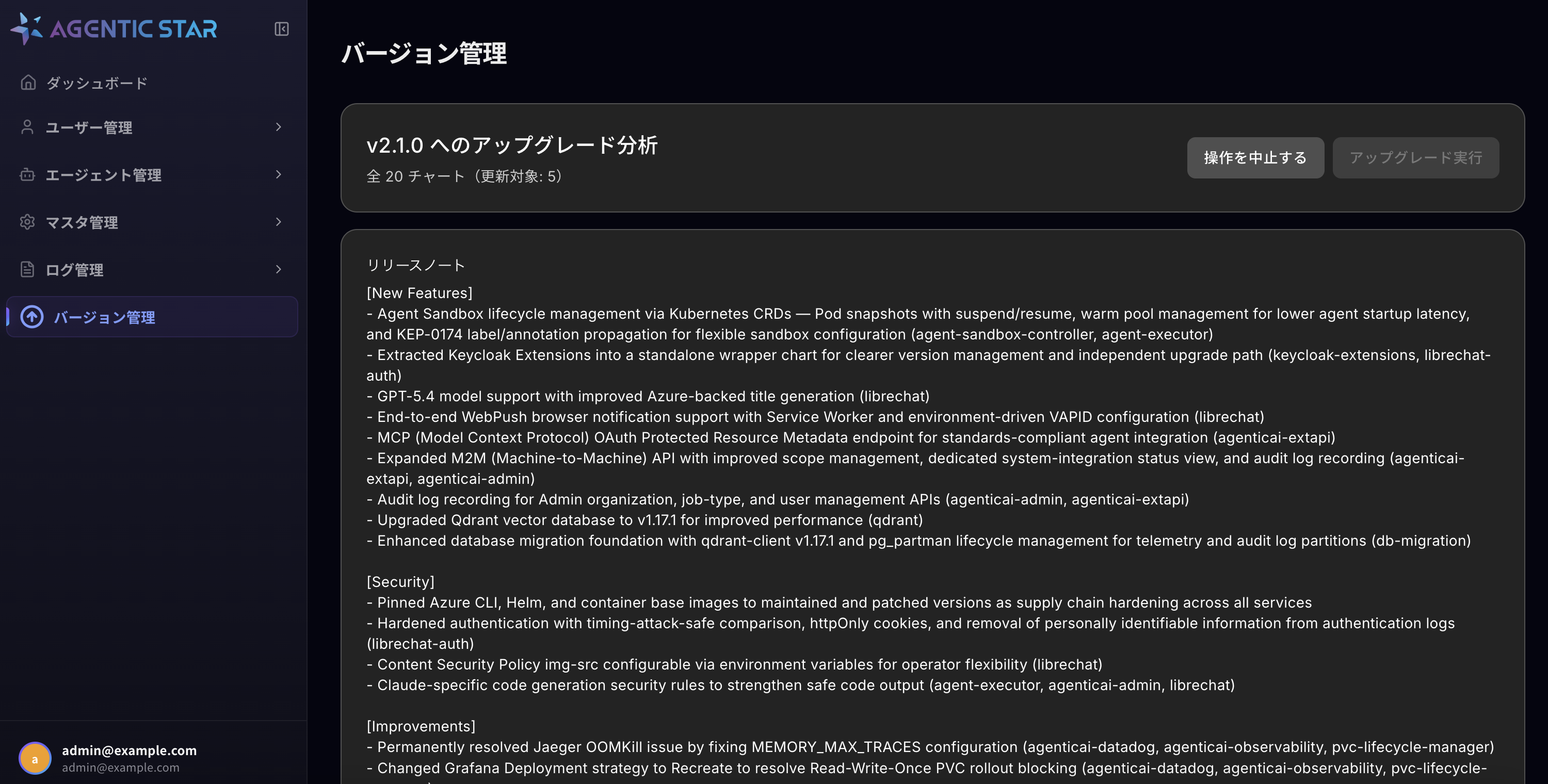
You can review:
- Release notes (new features, changes, security fixes, etc.)
- How many charts will be updated out of the total
- Auto-applied values (
auto_set) and values requiring input (user_input) for each service - When
user_inputis present: An input form is shown. Enter values referring to the hint for each item.
After reviewing/entering values, click the "Execute Upgrade" button at the top right.
A-5. Confirm execution
A confirmation modal is displayed.
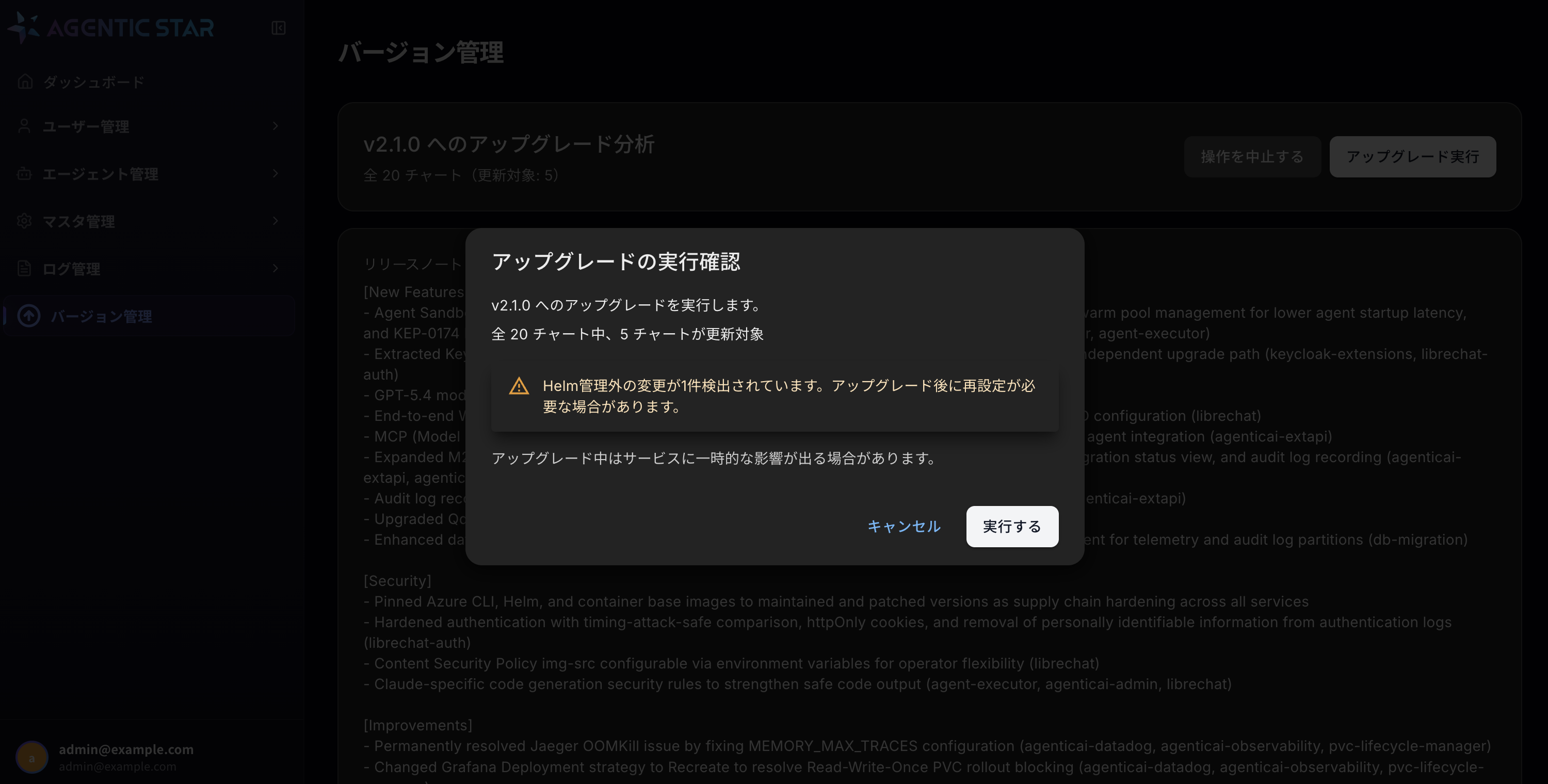
Review the warning messages:
- The number of charts to be upgraded
- A warning if Helm-external changes are detected (re-application may be required)
- Possible temporary impact on services during the upgrade
If everything looks good, click "Execute". To abort, click "Cancel".
A-6. Watch progress
The upgrade starts and the progress page is displayed.
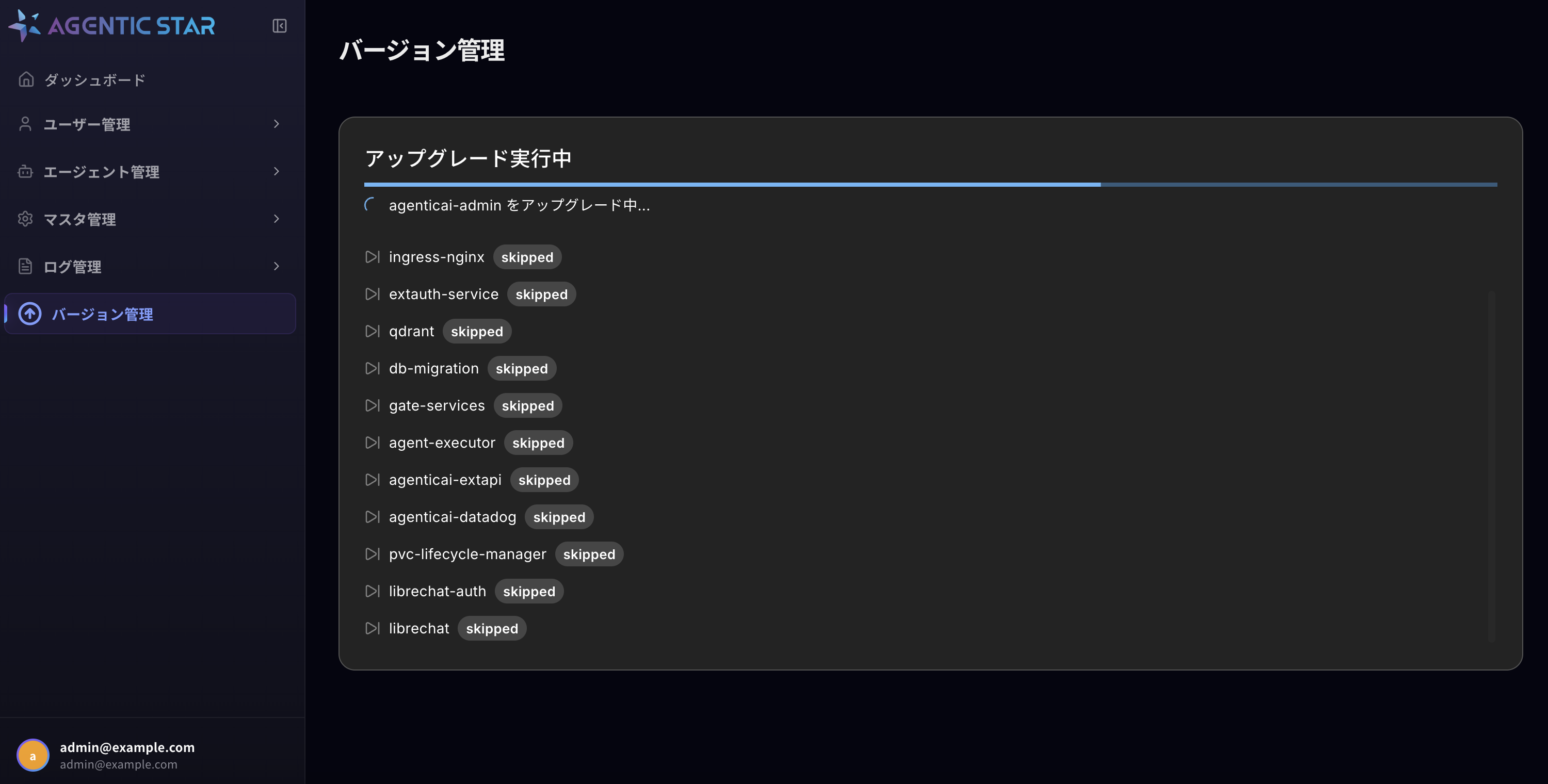
The page shows:
- An overall progress bar
- The chart currently being processed (
Upgrading <chart-name>...) - Status of each chart (
processing/completed/skipped/failed)
Charts that have no version change (already at target_version) are shown as skipped and helm upgrade is not executed.
You can close this page and the upgrade will continue, but keep it open if you want to monitor progress.
A-7. Confirm completion
When all charts are processed, the completion screen is displayed.
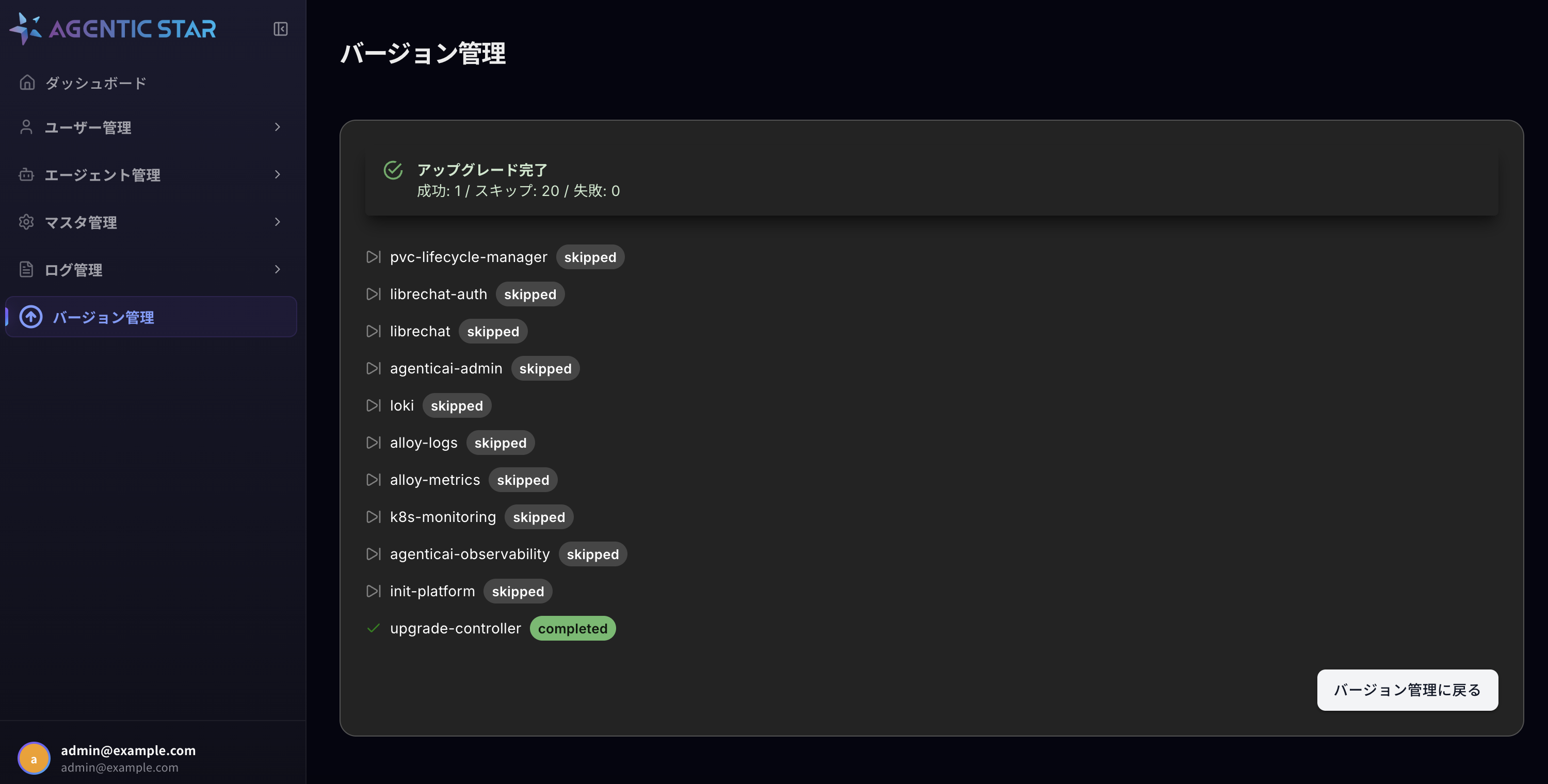
Verify the following:
- The header shows "✓ Upgrade Complete"
- Summary: Succeeded / Skipped / Failed counts
- Make sure Failed is
0
- Make sure Failed is
- Status list of each chart
The upgrade-controller itself also performs a self-upgrade at the end (shown as completed).
When done, click "Back to Version Management" to return to the version management page.
A-8. Verify after the update
On the Version Management page, confirm that "Current version" reflects the new version.
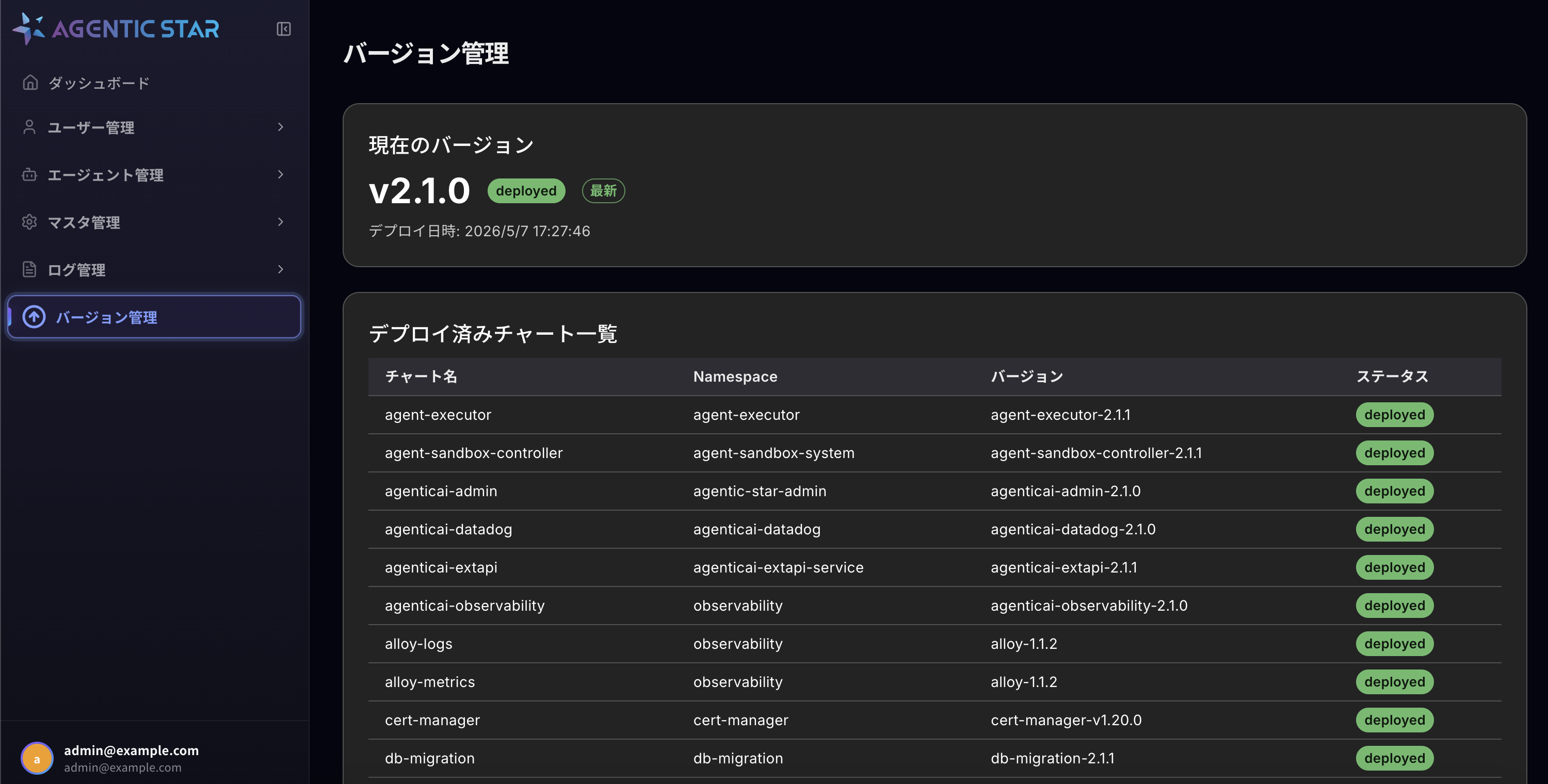
- Current version: The new version is shown with
deployedandLatest - Deployed charts: Each sub-chart is at the new version with
deployedstatus
A-9. Troubleshooting
| Situation | Action |
|---|---|
| The lock is not released and you cannot retry | Verify that no other upgrade is in progress. If clear, an administrator can force-release the lock. |
| Some charts failed | Check the error message of the failed charts on the completion screen. Inspect Pod status (kubectl get pods -A) and Pod logs in AKS, then recover via Method B (manual update) if needed. |
| The progress page does not advance for a long time | Check the upgrade-controller Pod logs (kubectl logs -n upgrade-controller deploy/upgrade-controller). |
| "Helm-external changes detected" warning appears | Settings applied manually after the previous upgrade may be overwritten. Re-apply your custom settings after completion. |
Method B: Manual Update (CLI operations)
This procedure upgrades each chart individually with kubectl / helm. Use it, for example, to recover a service that failed in Method A. The examples below upgrade to the latest Basic version (2.10.0).
Method A automatically applies the settings each version needs (newly added values and changed defaults). Method B does not apply these values automatically. Normally use Method A, and use Method B to recover a service that failed in Method A.
B-1. Prerequisites
- Connected to the Kubernetes cluster with
kubectl - Helm v3.14 or later installed (for
--reset-then-reuse-values) - Administrator privileges on the target cluster
In the Marketplace environment, Helm's storage driver is configmap, so you must add HELM_DRIVER=configmap to every helm command.
B-2. Update flow
- Download the umbrella Helm chart of the new version
- Extract it and check each service's version in Chart.yaml
- Download the individual charts
- Update each service with
helm upgrade --reset-then-reuse-valuesin the order of B-6 - Verify after the update
B-3. Download the umbrella Helm chart
Download the umbrella chart from the public repository (the latest Basic version is 2.10.0).
# Download the umbrella chart
curl -O https://agtstrmarketplacecharts.blob.core.windows.net/charts/agentic-star-platform-2.10.0.tgz

# Extract
tar xzf agentic-star-platform-2.10.0.tgz
B-4. Check versions
The extracted Chart.yaml defines each service's version. The versions in the table in B-6 are for 2.10.0.
cat agentic-star-platform/Chart.yaml
B-5. Download individual charts
Add the Helm repository and download the chart versions listed in Chart.yaml.
# Add the AGENTIC STAR repository
helm repo add agenticai-prod https://agtstrmarketplacecharts.blob.core.windows.net/charts
helm repo update

# Download an individual chart (e.g., agenticai-admin 2.10.0)
helm pull agenticai-prod/agenticai-admin --version 2.10.0 -d charts/

# Download all the charts in the table in B-6 in the same way
B-6. Service list (update order)
Update from top to bottom (the same order as Method A). Some charts have a release name different from the chart name (the release of agentic-star-front is librechat, and the release of agentic-star-auth is librechat-auth).
| Order | Release name | Chart (2.10.0) | Namespace | Notes |
|---|---|---|---|---|
| 1 | prometheus-operator | kube-prometheus-stack-79.5.0.tgz | monitoring | Prometheus monitoring stack (first, because it includes CRDs) |
| 2 | prometheus-adapter | prometheus-adapter-4.14.2.tgz | monitoring | Custom metrics |
| 3 | ingress-nginx | ingress-nginx-4.14.0.tgz | ingress-nginx | Ingress controller |
| 4 | extauth-service | extauth-service-2.10.1.tgz | proxy-system | Zero-trust authorization service |
| 5 | qdrant | qdrant-2.10.0.tgz | qdrant | Vector DB |
| 6 | db-migration | db-migration-2.10.2.tgz | db-migration | Database migration (waits for the Job to complete) |
| 7 | gate-services | gate-services-2.9.1.tgz | gate-services | Gateway |
| 8 | mail-ingress | mail-ingress-2.10.0.tgz | mail-ingress | Mail receiving (since 2.9.0) |
| 9 | agent-sandbox-controller | agent-sandbox-controller-2.10.0.tgz | agent-sandbox-system | Sandbox controller |
| 10 | agent-executor | agent-executor-2.10.0.tgz | agent-executor | Agent execution platform |
| 11 | agenticai-extapi | agenticai-extapi-2.10.0.tgz | agenticai-extapi-service | External API |
| 12 | agenticai-datadog | agenticai-datadog-2.10.0.tgz | agenticai-datadog | Datadog integration (optional) |
| 13 | pvc-lifecycle-manager | pvc-lifecycle-manager-2.10.0.tgz | pvc-lifecycle-manager | PVC lifecycle management |
| 14 | keycloak-extensions | keycloak-extensions-2.10.0.tgz | librechat-auth | Keycloak (before the authentication service) |
| 15 | librechat-auth | agentic-star-auth-2.10.0.tgz | librechat-auth | Authentication service |
| 16 | librechat | agentic-star-front-2.10.0.tgz | agentic-star-front | Main application |
| 17 | agenticai-admin | agenticai-admin-2.10.0.tgz | agentic-star-admin | Admin console |
| 18 | loki | loki-6.37.0.tgz | observability | Log storage |
| 19 | alloy-logs | alloy-1.1.2.tgz | observability | Log collector |
| 20 | alloy-metrics | alloy-1.1.2.tgz | observability | Metrics collector |
| 21 | k8s-monitoring | k8s-monitoring-3.1.2.tgz | observability | Kubernetes monitoring |
| 22 | agenticai-observability | agenticai-observability-2.10.0.tgz | observability | Grafana / Jaeger |
| 23 | init-platform | init-platform-2.10.0.tgz | librechat-auth | Initialization Job |
| 24 | upgrade-controller | upgrade-controller-2.10.0.tgz | upgrade-controller | Update feature (last; platformVersion is the version shown in the admin console) |
B-7. Update commands
Basic pattern
--reset-then-reuse-values applies your existing settings (the values set so far) on top of the new chart's defaults. For our own charts (other than third-party charts), specify the image tag that matches the chart version.
HELM_DRIVER=configmap helm upgrade <release-name> <chart-path> \
  --namespace <namespace> \
  --reset-then-reuse-values \
  --set-string "image.tag=<version>" \
  --wait \
  --timeout 10m
Commands for each service
1. prometheus-operator (Prometheus monitoring stack):
HELM_DRIVER=configmap helm upgrade prometheus-operator ./charts/kube-prometheus-stack-79.5.0.tgz \
  --namespace monitoring \
  --reset-then-reuse-values \
  --wait \
  --timeout 15m
The chart name is kube-prometheus-stack, but the release name is prometheus-operator.
2. prometheus-adapter (Custom metrics):
HELM_DRIVER=configmap helm upgrade prometheus-adapter ./charts/prometheus-adapter-4.14.2.tgz \
  --namespace monitoring \
  --reset-then-reuse-values \
  --wait \
  --timeout 10m
3. ingress-nginx (Ingress controller):
HELM_DRIVER=configmap helm upgrade ingress-nginx ./charts/ingress-nginx-4.14.0.tgz \
  --namespace ingress-nginx \
  --reset-then-reuse-values \
  --wait \
  --timeout 10m
4. extauth-service (Zero-trust authorization service):
HELM_DRIVER=configmap helm upgrade extauth-service ./charts/extauth-service-2.10.1.tgz \
  --namespace proxy-system \
  --reset-then-reuse-values \
  --set-string "image.tag=2.10.1" \
  --set-string "webhook.image.tag=2.10.1" \
  --set cert-manager.enabled=false \
  --wait \
  --timeout 20m
For extauth-service, also specify webhook.image.tag. Always add cert-manager.enabled=false (cert-manager is installed separately).
5. qdrant (Vector DB):
HELM_DRIVER=configmap helm upgrade qdrant ./charts/qdrant-2.10.0.tgz \
  --namespace qdrant \
  --reset-then-reuse-values \
  --wait \
  --timeout 20m
6. db-migration (Database migration):
HELM_DRIVER=configmap helm upgrade db-migration ./charts/db-migration-2.10.2.tgz \
  --namespace db-migration \
  --reset-then-reuse-values \
  --set-string "image.tag=2.10.2" \
  --wait \
  --wait-for-jobs \
  --timeout 60m
7. gate-services (Gateway):
HELM_DRIVER=configmap helm upgrade gate-services ./charts/gate-services-2.9.1.tgz \
  --namespace gate-services \
  --reset-then-reuse-values \
  --set-string "image.tag=2.9.1" \
  --wait \
  --timeout 10m
8. mail-ingress (Mail receiving):
HELM_DRIVER=configmap helm upgrade mail-ingress ./charts/mail-ingress-2.10.0.tgz \
  --namespace mail-ingress \
  --reset-then-reuse-values \
  --set-string "haraka.image.tag=2.10.0" \
  --wait \
  --timeout 10m
mail-ingress was added in 2.9.0. When upgrading from a version earlier than 2.9.0, mail-ingress is a new installation and the required settings are not applied, so use Method A.
9. agent-sandbox-controller (Sandbox controller):
HELM_DRIVER=configmap helm upgrade agent-sandbox-controller ./charts/agent-sandbox-controller-2.10.0.tgz \
  --namespace agent-sandbox-system \
  --reset-then-reuse-values \
  --set-string "image.tag=2.10.0" \
  --wait \
  --timeout 10m
10. agent-executor (Agent execution platform):
HELM_DRIVER=configmap helm upgrade agent-executor ./charts/agent-executor-2.10.0.tgz \
  --namespace agent-executor \
  --reset-then-reuse-values \
  --set-string "image.tag=2.10.0" \
  --wait \
  --timeout 20m
11. agenticai-extapi (External API):
HELM_DRIVER=configmap helm upgrade agenticai-extapi ./charts/agenticai-extapi-2.10.0.tgz \
  --namespace agenticai-extapi-service \
  --reset-then-reuse-values \
  --set-string "image.tag=2.10.0" \
  --wait \
  --timeout 10m
12. agenticai-datadog (Datadog integration):
HELM_DRIVER=configmap helm upgrade agenticai-datadog ./charts/agenticai-datadog-2.10.0.tgz \
  --namespace agenticai-datadog \
  --reset-then-reuse-values \
  --wait \
  --timeout 10m
13. pvc-lifecycle-manager (PVC lifecycle management):
HELM_DRIVER=configmap helm upgrade pvc-lifecycle-manager ./charts/pvc-lifecycle-manager-2.10.0.tgz \
  --namespace pvc-lifecycle-manager \
  --reset-then-reuse-values \
  --wait \
  --timeout 10m
14. keycloak-extensions (Keycloak):
HELM_DRIVER=configmap helm upgrade keycloak-extensions ./charts/keycloak-extensions-2.10.0.tgz \
  --namespace librechat-auth \
  --reset-then-reuse-values \
  --set-string "keycloakx.image.tag=2.10.0" \
  --wait \
  --timeout 20m
15. librechat-auth (Authentication service):
HELM_DRIVER=configmap helm upgrade librechat-auth ./charts/agentic-star-auth-2.10.0.tgz \
  --namespace librechat-auth \
  --reset-then-reuse-values \
  --set-string "image.tag=2.10.0" \
  --wait \
  --timeout 20m
16. librechat (Main application):
HELM_DRIVER=configmap helm upgrade librechat ./charts/agentic-star-front-2.10.0.tgz \
  --namespace agentic-star-front \
  --reset-then-reuse-values \
  --set-string "image.tag=2.10.0" \
  --wait \
  --timeout 20m
17. agenticai-admin (Admin console):
HELM_DRIVER=configmap helm upgrade agenticai-admin ./charts/agenticai-admin-2.10.0.tgz \
  --namespace agentic-star-admin \
  --reset-then-reuse-values \
  --set-string "image.tag=2.10.0" \
  --wait \
  --timeout 10m
18. loki (Log storage):
HELM_DRIVER=configmap helm upgrade loki ./charts/loki-6.37.0.tgz \
  --namespace observability \
  --reset-then-reuse-values \
  --wait \
  --timeout 20m
19. alloy-logs (Log collector):
HELM_DRIVER=configmap helm upgrade alloy-logs ./charts/alloy-1.1.2.tgz \
  --namespace observability \
  --reset-then-reuse-values \
  --wait \
  --timeout 20m
20. alloy-metrics (Metrics collector):
HELM_DRIVER=configmap helm upgrade alloy-metrics ./charts/alloy-1.1.2.tgz \
  --namespace observability \
  --reset-then-reuse-values \
  --wait \
  --timeout 20m
alloy-logs and alloy-metrics use the same chart (alloy-1.1.2.tgz), but their release names and values differ.
21. k8s-monitoring (Kubernetes monitoring):
HELM_DRIVER=configmap helm upgrade k8s-monitoring ./charts/k8s-monitoring-3.1.2.tgz \
  --namespace observability \
  --reset-then-reuse-values \
  --wait \
  --timeout 15m
22. agenticai-observability (Grafana / Jaeger):
HELM_DRIVER=configmap helm upgrade agenticai-observability ./charts/agenticai-observability-2.10.0.tgz \
  --namespace observability \
  --reset-then-reuse-values \
  --wait \
  --timeout 15m
23. init-platform (Initialization Job):
HELM_DRIVER=configmap helm upgrade init-platform ./charts/init-platform-2.10.0.tgz \
  --namespace librechat-auth \
  --reset-then-reuse-values \
  --set-string "image.tag=2.10.0" \
  --wait \
  --wait-for-jobs \
  --timeout 10m
24. upgrade-controller (Update feature):
HELM_DRIVER=configmap helm upgrade upgrade-controller ./charts/upgrade-controller-2.10.0.tgz \
  --namespace upgrade-controller \
  --reset-then-reuse-values \
  --set-string "image.tag=2.10.0" \
  --set-string "platformVersion=2.10.0" \
  --wait \
  --timeout 10m
B-8. Verify after the update
Check Pod status
# Check Pod status across all namespaces
HELM_DRIVER=configmap helm list -A

# Check Pods in a specific namespace
kubectl get pods -n <namespace>
Check logs
Verify there are no errors after the update.
# Check logs of a specific Pod
kubectl logs -n <namespace> <pod-name>

# Check recent events
kubectl get events -n <namespace> --sort-by='.lastTimestamp'
Notes
- Update on a per-service basis. We recommend updating one service at a time and verifying, rather than all at once (Method A handles this internally).
- Because we use
--reset-then-reuse-values, settings changed via the Domain Configuration Guide and Security Guide are preserved. - We recommend taking a backup before updating.
- If problems occur, you can roll back by running the same command with the previous version's chart (Method B).